
For developers, sysadmins, and power users
The Task Manager for Mac that answers the next question.
macOS has no Ctrl+Alt+Del. It has Force Quit for ending apps and Activity Monitor for a quick resource glance. ProcessSpy is the task manager you reach for when that isn't enough — the full command a process was launched with, what keeps restarting it, what it's connected to, who signed it, and how it behaved five minutes ago.
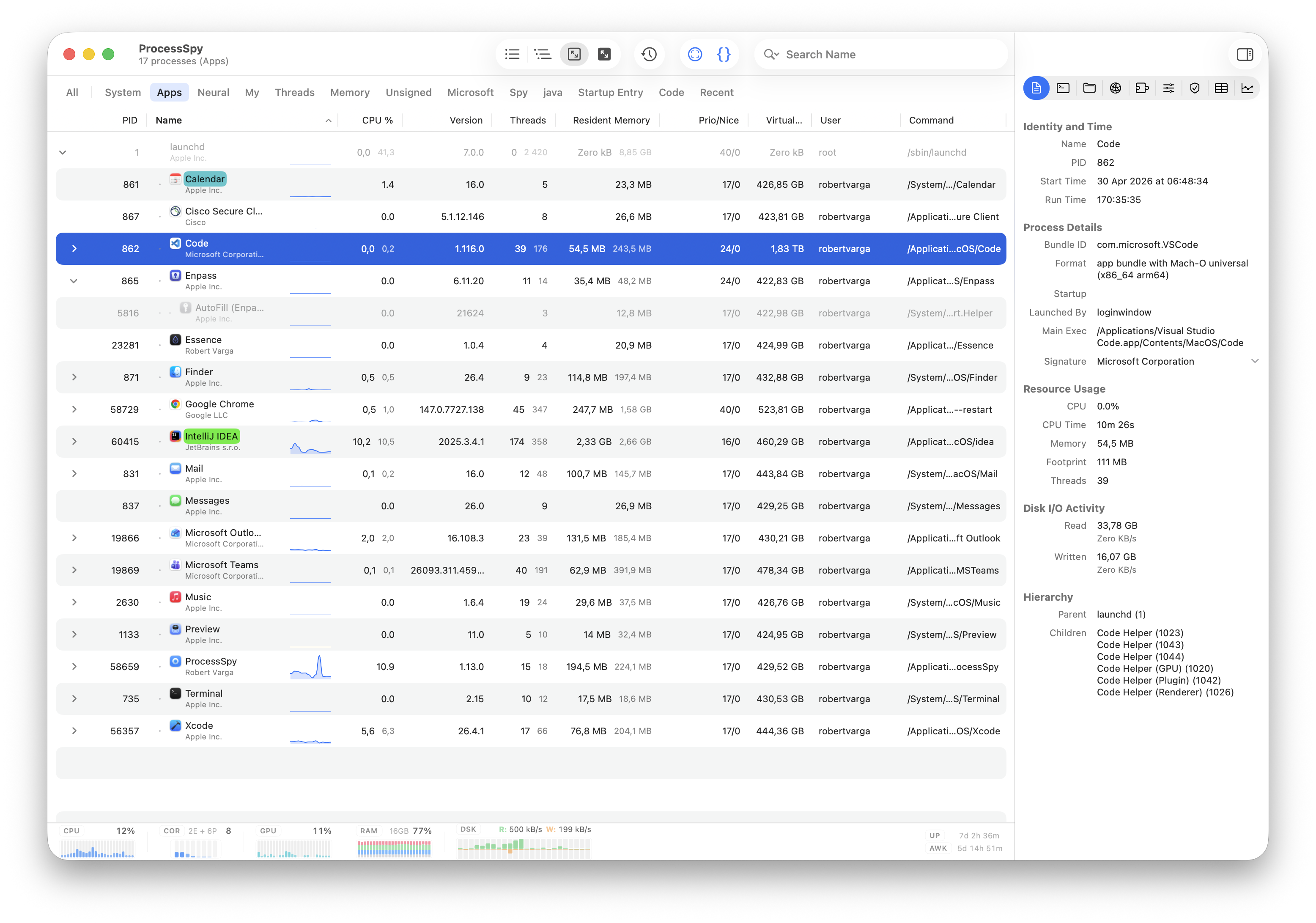
Where is the Task Manager on a Mac?
There isn't one window called Task Manager. macOS splits the job across two built-in tools — and stops well short of what a real troubleshooting session needs.
Force Quit
Press ⌘ ⌥ esc. Lists visible apps and ends them. No numbers, no background processes.
Activity Monitor
Applications → Utilities, or Spotlight. CPU, memory, energy, disk, and network per process — a good glance, a shallow investigation.
ProcessSpy
The power-user layer: process tree with aggregate totals, launch origin, full command line, per-process GPU, disk and network, signatures, and history.
What you actually open a task manager for
Nobody launches a task manager for fun. You open it because the fans are loud, the battery is draining, something is talking to the network, or a process you don't recognize won't go away.
"What is eating my CPU?"
Sort live CPU and memory, then use the tree view to see a whole app's real footprint — all of Chrome's helpers counted together as one number, not thirty rows you have to add up.
"What is this thing and where did it come from?"
See the executable path, full launch command with every argument, the parent that spawned it, and whether a LaunchAgent, daemon, or login item is what keeps bringing it back.
"Which window is that?"
Enter identify mode, click any window or toolbar icon on screen, and the owning process is selected in the table. See how it works.
"Is it phoning home?"
Per-process network throughput plus the individual connections behind it — local and remote address, protocol, and state — alongside the open files the process is holding.
"Should I trust it?"
Check the bundle ID, version, entitlements, and the organization that signed the binary before you decide whether a process belongs on your Mac.
"It spiked while I wasn't looking"
Recorded CPU and memory history lets you scroll back through the spike instead of staring at a live graph hoping it happens again — and finished processes stay available for inspection.
Mac task manager options, side by side
Force Quit ends apps. Activity Monitor measures them. ProcessSpy investigates them. Here is where each one stops.
| Task | Force Quit (⌘⌥esc) | Activity Monitor | ProcessSpy |
|---|---|---|---|
| See background processes | No — visible apps only. | Yes — all processes. | Yes — all processes, with helpers grouped under their parent. |
| Live CPU & memory | No. | Yes — the built-in standard. | Yes — plus aggregate totals for a process and all its children. |
| Per-process GPU & disk | No. | Partial — disk reads/writes; no per-process GPU. | Yes — per-process network, disk, and GPU metrics. |
| Process tree / hierarchy | No. | Limited — a "View as Hierarchy" toggle without aggregate totals. | Yes — tree view with parent/child relationships and aggregate totals. |
| Full command line & arguments | No. | No — process name only. | Yes — the full command used to start the process. |
| Environment variables | No. | No. | Yes — searchable KEY=VALUE list per process. |
| Identify a window's process | No. | No. | Yes — point-and-click identification anywhere on screen. |
| Network connections | No. | Limited — totals and throughput, not individual connections. | Yes — local/remote address, protocol, and state per connection. |
| Signature & publisher | No. | No. | Yes — signature details and signing organization (licensed). |
| Bundle metadata & entitlements | No. | No. | Yes — bundle ID, version, Info.plist, and entitlements. |
| Resource history | No. | Limited — live graphs over a short rolling window. | Yes — recorded CPU, Resident and Virtual Memory history you can scroll back through. |
| Remember finished processes | No. | No — once a process exits, it's gone from the list. | Yes — finished processes stay available for later inspection. |
| Search | Basic name filter. | Basic — filter the list by process name. | Quick search, multi-property search, and regex search. |
| Always within reach | Yes — a keyboard shortcut away. | Dock icon graphs only. | Menu bar item with live bars or sparklines and a rich popover. |
Feature descriptions are based on publicly documented capabilities of Apple's Force Quit Applications and Activity Monitor, and on ProcessSpy documentation. Some ProcessSpy features are license-only.
Apple, macOS, and Activity Monitor are trademarks of Apple Inc. Microsoft, Windows, and Task Manager are trademarks of Microsoft Corporation. All other product names, logos, and brands are property of their respective owners. ProcessSpy is an independent product and is not affiliated with or endorsed by Apple Inc.
Coming from Windows Task Manager?
The muscle memory doesn't transfer, but the workflow does. Here's where each Task Manager tab lands on a Mac.
| Windows Task Manager | On macOS | In ProcessSpy |
|---|---|---|
| Ctrl + Alt + Delete | ⌘ + ⌥ + esc opens Force Quit Applications. | Menu bar item — the full process list is one click away, always. |
| Processes tab | Activity Monitor's CPU and Memory tabs. | Process list and tree view with aggregate CPU, memory, disk, network, and GPU. |
| Details tab | Not available. | Inspector with PID, path, command line, environment, dylibs, files, and connections. |
| Startup apps tab | Scattered across System Settings login items and LaunchAgents on disk. | Launch origin per process — LaunchAgent, daemon, login item, or manual launch. |
| Services tab | launchd daemons and agents, mostly a terminal job. | Daemons and agents appear in the tree with their parent/child chain. |
| Performance tab | Activity Monitor live graphs, short rolling window. | Recorded per-process CPU and memory history, exportable to CSV. |
| "Which window is this?" | No equivalent. | Click any window on screen to select its process. |
If you're specifically looking for the Sysinternals experience, see Process Explorer for Mac.
Task Manager on Mac: common questions
Does a Mac have a Task Manager?
Not under that name. macOS splits the job in two: Force Quit Applications ends visible apps, and Activity Monitor shows resource usage per process. Neither tells you how a process was launched, what it's connected to, or who signed it.
What is the Task Manager shortcut on a Mac?
⌘ ⌥ esc opens Force Quit Applications — the closest thing to Ctrl+Alt+Delete. Activity Monitor has no default shortcut; open it from Applications → Utilities or via Spotlight.
Why isn't Activity Monitor enough?
It answers "what's using my CPU" and stops there. See 10 things Activity Monitor doesn't show for the specifics, or the full Activity Monitor comparison.
Is ProcessSpy free?
It's freemium. Everyday task-manager work — the process list and tree, live resource usage, search, and point-and-click window identification — is in the free version. A license unlocks extras such as signature and publisher details and recorded CPU and memory history.
Does it run on Apple Silicon?
Yes — a native macOS app for macOS 14 and later, universal for Apple Silicon and Intel, Apple-notarized, around 4 MB.
Get a real task manager for your Mac
Stop guessing which process is which. See the tree, the command line, the connections, and the history.